
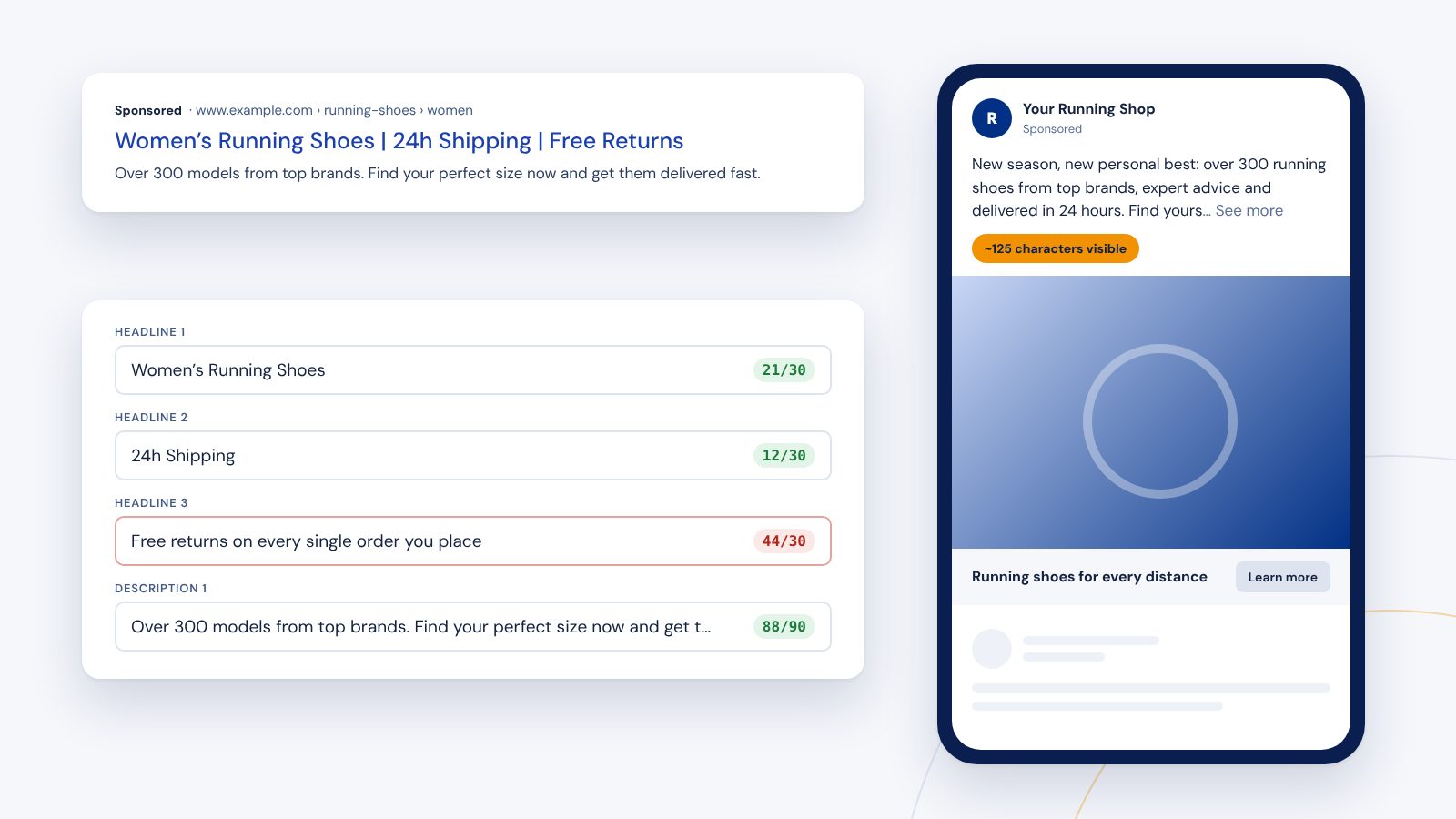
Anyone who writes ads quickly runs into limits: Google simply rejects headlines that are too long, and on Meta the rest of your text disappears behind "See more". Both cost impact. This overview shows which limits apply, why the first characters matter most and how to check your copy before uploading it.
The fastest way is our free ad preview: write your copy and instantly see character counters and a preview for Google and Meta. Everything runs in your browser, nothing is stored.
Google Search: responsive search ads
A responsive search ad (RSA) consists of several assets that Google recombines for every search:
- Headlines: at least 3, up to 15, each up to 30 characters
- Descriptions: at least 2, up to 4, each up to 90 characters
- Display path: 2 fields of up to 15 characters each, shown after the domain in the display URL
Usually two to three headlines and one to two descriptions are shown, and Google decides which. So every headline has to work on its own and fit with every other one. Repetition, such as the brand name three times, wastes space.
A few details that are often overlooked when counting:
- Spaces and punctuation count.
- Double-width characters, for example in Chinese, Japanese or Korean, count twice.
- With keyword insertion like
{KeyWord:Running Shoes}, the default text counts. If the inserted keyword is too long, Google shows the default text instead. - Pinning fixes the position where a headline appears. It helps with mandatory information but limits Google's optimization. Use it sparingly.
Google Search: assets (extensions)
The extra information below the ad has its own limits too:
- Sitelinks: link text up to 25 characters, two description lines of up to 35 characters each
- Callouts: up to 25 characters
- Structured snippets: each value up to 25 characters
Sitelinks in particular make ads much larger. Short, specific link texts like "See pricing" or "Book a call" work better than generic ones like "Learn more".
Microsoft Advertising
Microsoft Advertising uses the responsive search ad format with the same limits: headlines up to 30, descriptions up to 90 and paths up to 15 characters. If you import campaigns from Google Ads, your copy will usually fit. A look at the preview is still worth it, as Microsoft sometimes combines assets differently.
Meta: the beginning is what counts
On Facebook and Instagram there are fewer hard limits, but Meta truncates text depending on placement and device. These guidelines have proven themselves:
- Primary text: in the feed, roughly the first 125 characters are visible; the rest sits behind "See more"
- Headline: up to about 40 characters; longer ones are often cut off
- Description: up to about 30 characters; many placements don't show it at all
So put the most important idea first: the benefit for your audience, not your company name. Anyone still reading after 125 characters is interested. Anyone who isn't should still have understood what it's about. Longer copy is allowed and can make sense for offers that need explaining, as long as the opening lands.
Practical tips for short, strong copy
- Write first, then cut: draft without limits, then trim deliberately. Filler words like "now", "simply" or "our" are the first candidates.
- Benefits over features: "Up to 30% lower energy bills" beats "Energy-efficient technology".
- Numbers over words: "24h shipping" is shorter and more concrete than "shipping within one day".
- Variety in RSAs: mix headlines with benefit, offer, trust (for example reviews or experience) and call to action.
- Check the preview: see how the ad looks on a smartphone, where space is tightest.
Test your copy in advance
The editors in Google Ads and Meta Ads Manager do show character counts, but only once you're already in the middle of building a campaign. For drafts, client approvals or A/B variants, a separate step is more convenient.
That's why we built the ad preview. It's free and works without signing up:
- character counters for every headline, description and both paths
- checks for minimum count, limits and duplicate headlines
- desktop and mobile preview with changing combinations
- Meta feed preview with the visible text portion, your own image and call to action
Your copy stays in your browser and is neither stored nor transmitted.
Platforms update their specifications from time to time. Information as of October 2026.